Start Menu Button Disappears
Posted: 12.05.2010 05:16:06
This is a rare occurrence, but occasionally, when I switch desktops rapidly, the Start Menu button disappears. The taskbar remains there, so it's not a matter of hiding and showing the taskbar.
I have the taskbar set to autohide however, and I have noticed that whenever this happens, the taskbar quickly comes in and out.
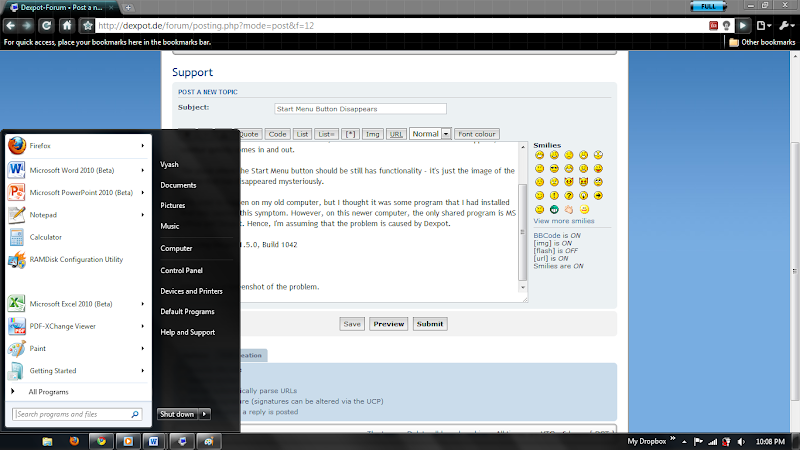
The place where the Start Menu button should be still has functionality - it's just the image of the button that has disappeared mysteriously.
This used to happen on my old computer, but I thought it was some program that I had installed that was causing this symptom. However, on this newer computer, the only shared program is MS Office and Dexpot. Hence, I'm assuming that the problem is caused by Dexpot.
I'm using Dexpot 1.5.0, Build 1042 on Windows 7 Professional (x64)
Attached is a screenshot of the problem.
I have the taskbar set to autohide however, and I have noticed that whenever this happens, the taskbar quickly comes in and out.
The place where the Start Menu button should be still has functionality - it's just the image of the button that has disappeared mysteriously.
This used to happen on my old computer, but I thought it was some program that I had installed that was causing this symptom. However, on this newer computer, the only shared program is MS Office and Dexpot. Hence, I'm assuming that the problem is caused by Dexpot.
I'm using Dexpot 1.5.0, Build 1042 on Windows 7 Professional (x64)
Attached is a screenshot of the problem.
 ,
,