iTunes glitch?

Post any technical problems or questions you have while using or configuring Dexpot.
Bug-Tracker
dexm
Posts: 5
Joined: 27.12.2013 01:59:06

iTunes glitch?

Postby dexm » 27.12.2013 02:18:39

Hi, I am new to Dexpot, and so far I really like this program to run different resolution desktops.

"Desktop 1" is set to 3200 x 1800 with a rule to keep iTunes on it.
"Desktop 2" is set to 1920 x 1200.

If can move back and forth both desktops no problem, with no visual glitch. When I start iTunes from Desktop 1, it stays on this desktop and display fine. Then I minimize iTunes, go to Desktop 2, and I see in the middle of the screen like a small part of iTunes (see screenshot). If I close iTunes OR don't minimize iTunes on Desktop 1, the visual glitch on Desktop 2 doesn't appear. I know some will respond just don't minimize iTunes on Desktop 1 :twisted: but you know sometimes you minimize the application to work with another application. Is there a way to fix this visual glitch, like forcing a desktop refresh?

Running Dexpot version 1.6.10 build 2373 on Windows 8.1 Pro.
Attachments
Screenshot 2013-12-26 20.06.43.png
Screenshot 2013-12-26 20.06.43.png (56.56 KiB) Viewed 2806 times

User avatar
Patrick
Developer
Posts: 7380
Joined: 04.03.2003 14:51:26

Re: iTunes glitch?

Postby Patrick » 27.12.2013 13:54:05

:dex:

I haven't tried to reproduce this yet, but...

dexm wrote:If I close iTunes OR don't minimize iTunes on Desktop 1, the visual glitch on Desktop 2 doesn't appear. I know some will respond just don't minimize iTunes on Desktop 1 :twisted: but you know sometimes you minimize the application to work with another application.

how about starting iTunes on Desktop 3 or another otherwise unused desktop and not minimizing it there? :wink:

dexm
Posts: 5
Joined: 27.12.2013 01:59:06

Re: iTunes glitch?

Postby dexm » 27.12.2013 15:25:31

Thanks Patrick for the quick reply!

I just tried to set a rule that if iTunes is started from Desktop 1 it should go on Desktop 3, but this doesn't work because iTunes remains on Desktop 1. iTunes is really a picky program...

Starting iTunes on Desktop 3 doesn't make the visual glitch on Desktop 2 :)

User avatar
Patrick
Developer
Posts: 7380
Joined: 04.03.2003 14:51:26

Re: iTunes glitch?

Postby Patrick » 27.12.2013 15:28:09

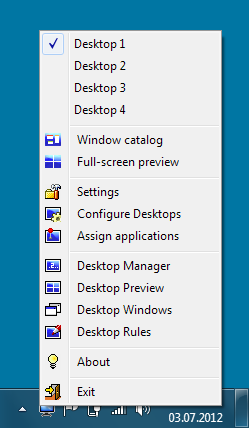
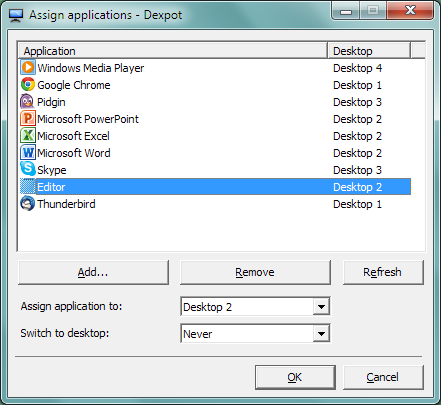
Try "Assign applications".

dexm
Posts: 5
Joined: 27.12.2013 01:59:06

Re: iTunes glitch?

Postby dexm » 27.12.2013 16:26:57

Sorry, but I don't understand where to find this in the rules... Maybe I this is not the correct place?

Screenshot 2013-12-27 10.25.20.png
Screenshot 2013-12-27 10.25.20.png (24.31 KiB) Viewed 2796 times

User avatar
Patrick
Developer
Posts: 7380
Joined: 04.03.2003 14:51:26

Re: iTunes glitch?

Postby Patrick » 27.12.2013 16:29:59

It's a separate dialog with its own entry in the main Dexpot menu. Restart iTunes after making the assignment.

Image

Image

dexm
Posts: 5
Joined: 27.12.2013 01:59:06

Re: iTunes glitch?

Postby dexm » 27.12.2013 16:38:23

Screenshot 2013-12-27 10.35.02.png
Screenshot 2013-12-27 10.35.02.png (23.75 KiB) Viewed 2792 times

OK I got that, thank you.

But now, guess what, the visual glitch appears on Desktop 1 and Desktop 2 after I switch from Desktop 3 where iTunes is running. Ah ah I am good, I made things worse! :oops:

User avatar
Patrick
Developer
Posts: 7380
Joined: 04.03.2003 14:51:26

Re: iTunes glitch?

Postby Patrick » 27.12.2013 16:54:15

Save the attached file to your Dexpot installation folder and restart Dexpot.

mywechsel.ini
(27 Bytes) Downloaded 155 times

dexm
Posts: 5
Joined: 27.12.2013 01:59:06

Re: iTunes glitch?

Postby dexm » 27.12.2013 17:51:01

Thanks Patrick :)

I replaced the file, restarted Dexpot and kept iTunes on Desktop 3 with a rule.
Did a few desktop switch with iTunes minimized and maximized, so far can't see the visual glitch on Desktops 1/2 :D


Return to “Support”

Who is online

Users browsing this forum: No registered users and 101 guests