In one of the last couple updates (ironically, possibly when
this request I made was implemented ), the Desktop Preview auto-hide changed its behavior when working with multiple monitors, and can't anchor to all monitor boundaries anymore.
It's easier to explain if I show you my my desktop config:
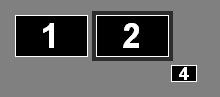
1 and 2 are my main monitors. "Monitor 4" is an output to a TV in another room. I usually have Desktop Preview anchored (with auto-hide) to the right side of Monitor 2.
Since a recent update, Desktop Preview no longer will anchor to the right side of Monitor 2: it either anchors to the Top/Bottom of Monitor 2 depending on where I initially put Desktop Preview box.
If I move Monitor 4 so it's no longer the most rightward screen, the Preview works like it used to, and anchors/autohides fine. Is this intentional? Is there any chance of reverting the behavior?
In one of the last couple updates (ironically, possibly when [url=http://dexpot.de/forum/viewtopic.php?f=25&t=2434]this request I made was implemented[/url] ), the Desktop Preview auto-hide changed its behavior when working with multiple monitors, and can't anchor to all monitor boundaries anymore.
It's easier to explain if I show you my my desktop config:
[img]http://i245.photobucket.com/albums/gg79/traycerb/desktopconfig.jpg[/img]
1 and 2 are my main monitors. "Monitor 4" is an output to a TV in another room. I usually have Desktop Preview anchored (with auto-hide) to the right side of Monitor 2.
Since a recent update, Desktop Preview no longer will anchor to the right side of Monitor 2: it either anchors to the Top/Bottom of Monitor 2 depending on where I initially put Desktop Preview box.
If I move Monitor 4 so it's no longer the most rightward screen, the Preview works like it used to, and anchors/autohides fine. Is this intentional? Is there any chance of reverting the behavior?